
This post shows how to:
- View SATA drive information in Unifi Protect ENVR console or via command line (SSH console)
- map ataXX device to sdX device (e.g. ata15 to sdc)
- map sdX to device serial number (e.g. sdc = WD-SERIAL03)
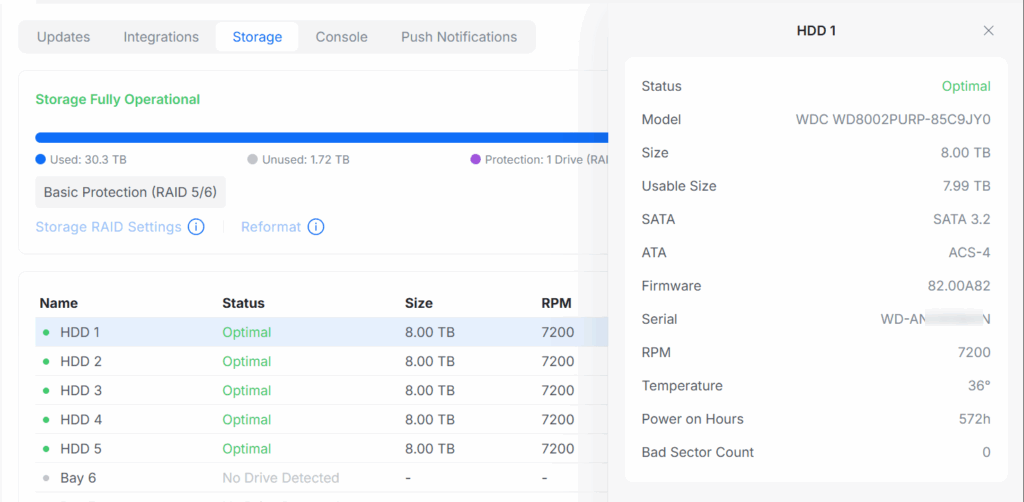
- Use Unifi Protect Control Panel to map the physical HDD enclosure number to device serial number (HDD 3 = WD-SERIAL03)
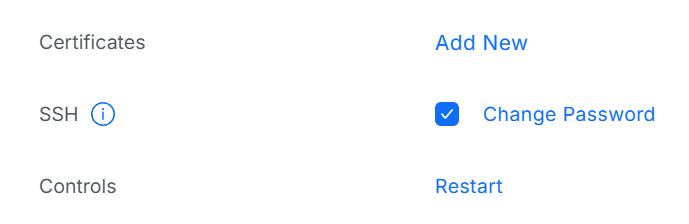
You need to enable SSH access and set a password to your ENVR via Unifi Protect via Settings (Gear icon) => Control Plane => Console => SSH (check the box)
View boot up messages (kernel ring buffer)
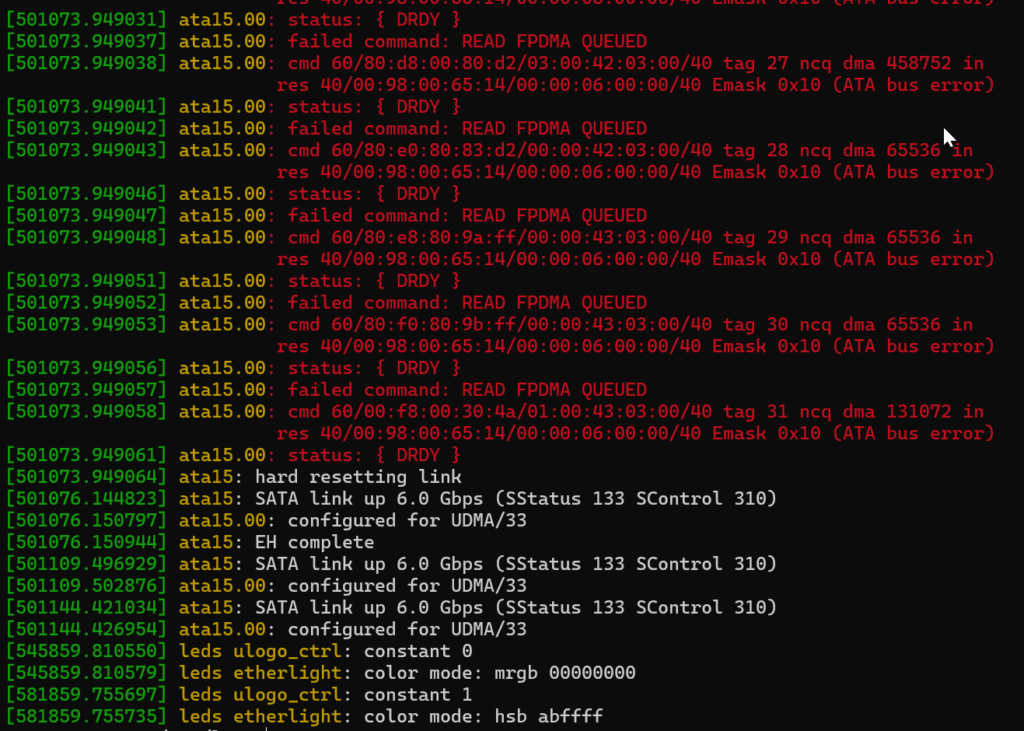
Run dmesg
Here we can see we have a problem with ata15 but what SATA drive is that?
Following is an example of error messages of a bad HDD in /var/log/messages this is mix of complaints about ata15 and sdc (the bad SATA HDD) so you need to be able to map between sdX and ataX references to easily identify the drive or drives with a problem
2025-10-04T09:45:49+10:00 MYENVR kernel: ata15: hard resetting link
2025-10-04T09:45:51+10:00 MYENVR kernel: ata15: failed to resume link (SControl 0)
2025-10-04T09:45:52+10:00 MYENVR kernel: ata15: SATA link down (SStatus 0 SControl 0)
2025-10-04T09:45:57+10:00 MYENVR kernel: ata15: hard resetting link
2025-10-04T09:45:59+10:00 MYENVR kernel: ata15: failed to resume link (SControl 0)
2025-10-04T09:46:00+10:00 MYENVR kernel: ata15: SATA link down (SStatus 0 SControl 0)
2025-10-04T09:46:01+10:00 MYENVR kernel: ata15.00: disabled
2025-10-04T09:46:01+10:00 MYENVR kernel: sd 14:0:0:0: [sdc] tag#2 UNKNOWN(0x2003) Result: hostbyte=0x00 driverbyte=DRIVER_OK cmd_age=20s
2025-10-04T09:46:01+10:00 MYENVR kernel: sd 14:0:0:0: [sdc] tag#2 Sense Key : 0x5 [current]
2025-10-04T09:46:01+10:00 MYENVR kernel: sd 14:0:0:0: [sdc] tag#2 ASC=0x21 ASCQ=0x4
2025-10-04T09:46:01+10:00 MYENVR kernel: sd 14:0:0:0: [sdc] tag#2 CDB: opcode=0x88 88 00 00 00 00 02 52 6b 24 00 00 00 03 80 00 00
2025-10-04T09:46:01+10:00 MYENVR kernel: sd 14:0:0:0: [sdc] tag#4 UNKNOWN(0x2003) Result: hostbyte=0x00 driverbyte=DRIVER_OK cmd_age=20s
2025-10-04T09:46:01+10:00 MYENVR kernel: sd 14:0:0:0: [sdc] tag#4 Sense Key : 0x5 [current]
2025-10-04T09:46:01+10:00 MYENVR kernel: sd 14:0:0:0: [sdc] tag#4 ASC=0x21 ASCQ=0x4
2025-10-04T09:46:01+10:00 MYENVR kernel: sd 14:0:0:0: [sdc] tag#4 CDB: opcode=0x88 88 00 00 00 00 02 53 1a 2c 00 00 00 03 80 00 00
2025-10-04T09:46:01+10:00 MYENVR kernel: md/raid:md3: read error not correctable (sector 9967381504 on sdc5).
2025-10-04T09:46:01+10:00 MYENVR kernel: md/raid:md3: read error not correctable (sector 9967381632 on sdc5).
2025-10-04T09:46:01+10:00 MYENVR kernel: md/raid:md3: read error not correctable (sector 9967381760 on sdc5).
2025-10-04T09:46:01+10:00 MYENVR kernel: md/raid:md3: read error not correctable (sector 9967381888 on sdc5).
2025-10-04T09:46:01+10:00 MYENVR kernel: md/raid:md3: read error not correctable (sector 9967382016 on sdc5).
2025-10-04T09:46:01+10:00 MYENVR kernel: md/raid:md3: read error not correctable (sector 9967382144 on sdc5).
2025-10-04T09:46:01+10:00 MYENVR kernel: md/raid:md3: read error not correctable (sector 9967382272 on sdc5).
2025-10-04T09:46:01+10:00 MYENVR kernel: sd 14:0:0:0: [sdc] tag#5 UNKNOWN(0x2003) Result: hostbyte=0x00 driverbyte=DRIVER_OK cmd_age=20s
2025-10-04T09:46:01+10:00 MYENVR kernel: sd 14:0:0:0: [sdc] tag#5 Sense Key : 0x5 [current]
2025-10-04T09:46:01+10:00 MYENVR kernel: sd 14:0:0:0: [sdc] tag#5 ASC=0x21 ASCQ=0x4
2025-10-04T09:46:01+10:00 MYENVR kernel: sd 14:0:0:0: [sdc] tag#5 CDB: opcode=0x88 88 00 00 00 00 02 53 c6 a0 00 00 00 01 00 00 00
2025-10-04T09:46:01+10:00 MYENVR kernel: md/raid:md3: read error not correctable (sector 9978683392 on sdc5).
2025-10-04T09:46:01+10:00 MYENVR kernel: md/raid:md3: read error not correctable (sector 9978683520 on sdc5).
2025-10-04T09:46:01+10:00 MYENVR kernel: sd 14:0:0:0: [sdc] tag#8 UNKNOWN(0x2003) Result: hostbyte=0x00 driverbyte=DRIVER_OK cmd_age=20s
2025-10-04T09:46:01+10:00 MYENVR kernel: sd 14:0:0:0: [sdc] tag#8 Sense Key : 0x5 [current]
2025-10-04T09:46:01+10:00 MYENVR kernel: sd 14:0:0:0: [sdc] tag#8 ASC=0x21 ASCQ=0x4
2025-10-04T09:46:01+10:00 MYENVR kernel: sd 14:0:0:0: [sdc] tag#8 CDB: opcode=0x88 88 00 00 00 00 02 3a 04 38 00 00 00 01 80 00 00
2025-10-04T09:46:01+10:00 MYENVR kernel: md/raid:md3: read error not correctable (sector 9546512384 on sdc5).
2025-10-04T09:46:01+10:00 MYENVR kernel: sd 14:0:0:0: [sdc] tag#9 UNKNOWN(0x2003) Result: hostbyte=0x00 driverbyte=DRIVER_OK cmd_age=20s
2025-10-04T09:46:01+10:00 MYENVR kernel: sd 14:0:0:0: [sdc] tag#9 Sense Key : 0x5 [current]
2025-10-04T09:46:01+10:00 MYENVR kernel: sd 14:0:0:0: [sdc] tag#9 ASC=0x21 ASCQ=0x4
2025-10-04T09:46:01+10:00 MYENVR kernel: sd 14:0:0:0: [sdc] tag#9 CDB: opcode=0x88 88 00 00 00 00 02 53 92 d4 00 00 00 03 80 00 00
2025-10-04T09:46:01+10:00 MYENVR kernel: sd 14:0:0:0: [sdc] tag#10 UNKNOWN(0x2003) Result: hostbyte=0x00 driverbyte=DRIVER_OK cmd_age=20s
2025-10-04T09:46:01+10:00 MYENVR kernel: sd 14:0:0:0: [sdc] tag#10 Sense Key : 0x5 [current]
2025-10-04T09:46:01+10:00 MYENVR kernel: sd 14:0:0:0: [sdc] tag#10 ASC=0x21 ASCQ=0x4
2025-10-04T09:46:01+10:00 MYENVR kernel: sd 14:0:0:0: [sdc] tag#10 CDB: opcode=0x88 88 00 00 00 00 02 53 b2 04 00 00 00 04 00 00 00
2025-10-04T09:46:01+10:00 MYENVR kernel: sd 14:0:0:0: [sdc] tag#11 UNKNOWN(0x2003) Result: hostbyte=0x00 driverbyte=DRIVER_OK cmd_age=20s
2025-10-04T09:46:01+10:00 MYENVR kernel: sd 14:0:0:0: [sdc] tag#11 Sense Key : 0x5 [current]
2025-10-04T09:46:01+10:00 MYENVR kernel: sd 14:0:0:0: [sdc] tag#11 ASC=0x21 ASCQ=0x4
2025-10-04T09:46:01+10:00 MYENVR kernel: sd 14:0:0:0: [sdc] tag#11 CDB: opcode=0x88 88 00 00 00 00 02 51 e6 04 00 00 00 02 80 00 00
2025-10-04T09:46:01+10:00 MYENVR kernel: sd 14:0:0:0: [sdc] tag#12 UNKNOWN(0x2003) Result: hostbyte=0x00 driverbyte=DRIVER_OK cmd_age=20s
2025-10-04T09:46:01+10:00 MYENVR kernel: sd 14:0:0:0: [sdc] tag#12 Sense Key : 0x5 [current]
2025-10-04T09:46:01+10:00 MYENVR kernel: sd 14:0:0:0: [sdc] tag#12 ASC=0x21 ASCQ=0x4
2025-10-04T09:46:01+10:00 MYENVR kernel: sd 14:0:0:0: [sdc] tag#12 CDB: opcode=0x88 88 00 00 00 00 02 50 98 6f 80 00 00 00 80 00 00
2025-10-04T09:46:01+10:00 MYENVR kernel: sd 14:0:0:0: [sdc] tag#13 UNKNOWN(0x2003) Result: hostbyte=0x00 driverbyte=DRIVER_OK cmd_age=20s
2025-10-04T09:46:01+10:00 MYENVR kernel: sd 14:0:0:0: [sdc] tag#13 Sense Key : 0x5 [current]
2025-10-04T09:46:01+10:00 MYENVR kernel: sd 14:0:0:0: [sdc] tag#13 ASC=0x21 ASCQ=0x4
2025-10-04T09:46:01+10:00 MYENVR kernel: sd 14:0:0:0: [sdc] tag#13 CDB: opcode=0x88 88 00 00 00 00 02 50 98 6d 80 00 00 02 00 00 00
2025-10-04T09:46:01+10:00 MYENVR kernel: sd 14:0:0:0: [sdc] tag#16 UNKNOWN(0x2003) Result: hostbyte=0x00 driverbyte=DRIVER_OK cmd_age=20s
2025-10-04T09:46:01+10:00 MYENVR kernel: sd 14:0:0:0: [sdc] tag#16 Sense Key : 0x5 [current]
2025-10-04T09:46:01+10:00 MYENVR kernel: sd 14:0:0:0: [sdc] tag#16 ASC=0x21 ASCQ=0x4
2025-10-04T09:46:01+10:00 MYENVR kernel: sd 14:0:0:0: [sdc] tag#16 CDB: opcode=0x88 88 00 00 00 00 02 53 68 75 00 00 00 03 00 00 00
2025-10-04T09:46:01+10:00 MYENVR kernel: ata15: EH complete
2025-10-04T09:46:01+10:00 MYENVR kernel: ata15.00: detaching (SCSI 14:0:0:0)
2025-10-04T09:46:01+10:00 MYENVR kernel: sd 14:0:0:0: [sdc] Synchronizing SCSI cache
2025-10-04T09:46:01+10:00 MYENVR kernel: sd 14:0:0:0: [sdc] Synchronize Cache(10) failed: Result: hostbyte=0x04 driverbyte=DRIVER_OK
2025-10-04T09:46:01+10:00 MYENVR kernel: sd 14:0:0:0: [sdc] Stopping disk
2025-10-04T09:46:01+10:00 MYENVR kernel: sd 14:0:0:0: [sdc] Start/Stop Unit failed: Result: hostbyte=0x04 driverbyte=DRIVER_OK
2025-10-04T09:46:02+10:00 MYENVR /usr/sbin/usd[1191]: [INFO] Clear unload disk sdc
2025-10-04T13:18:23+10:00 MYENVR kernel: Booting Linux on physical CPU 0x0000000000 [0x410fd490]
Map ataX to sdX
Disk related Error messages also appear in /var/log/messages
Given this example of /var/log/messages how do you know which drive ata15 it relates to?
2025-10-12T09:20:03+11:00 MYENVR kernel: ata15: hard resetting link
2025-10-12T09:20:05+11:00 MYENVR kernel: ata15: SATA link up 6.0 Gbps (SStatus 133 SControl 310)
2025-10-12T09:20:05+11:00 MYENVR kernel: ata15.00: configured for UDMA/33
2025-10-12T09:20:05+11:00 MYENVR kernel: ata15: EH complete
2025-10-12T09:20:38+11:00 MYENVR kernel: ata15: hard resetting link
2025-10-12T09:20:40+11:00 MYENVR kernel: ata15: SATA link up 6.0 Gbps (SStatus 133 SControl 310)
2025-10-12T09:20:40+11:00 MYENVR kernel: ata15.00: configured for UDMA/33
2025-10-12T09:20:40+11:00 MYENVR kernel: ata15.00: retrying FLUSH 0xea Emask 0x10
2025-10-12T09:20:40+11:00 MYENVR kernel: ata15: EH complete
2025-10-12T09:21:13+11:00 MYENVR kernel: ata15: hard resetting link
2025-10-12T09:21:14+11:00 MYENVR kernel: ata15: SATA link up 6.0 Gbps (SStatus 133 SControl 310)
2025-10-12T09:21:19+11:00 MYENVR kernel: ata15.00: qc timeout (cmd 0xec)
2025-10-12T09:21:19+11:00 MYENVR kernel: ata15.00: failed to IDENTIFY (I/O error, err_mask=0x4)
2025-10-12T09:21:19+11:00 MYENVR kernel: ata15: hard resetting link
You can run ls -l /sys/block/sd* to show the ata to sd mapping in this case ata15 maps to /dev/sdc
root@MYENVR:/sys/block# ls -l /sys/block/sd*
lrwxrwxrwx 1 root root 0 Oct  6 14:22 /sys/block/sda -> ../devices/platform/0.soc/878070000000.pci/pci0007:00/0007:00:00.0/0007:01:00.0/ata14/host13/target13:0:0/13:0:0:0/block/sda/
lrwxrwxrwx 1 root root 0 Oct  6 14:22 /sys/block/sdb -> ../devices/platform/0.soc/878050000000.pci/pci0005:00/0005:00:00.0/0005:01:00.0/ata6/host5/target5:0:0/5:0:0:0/block/sdb/
lrwxrwxrwx 1 root root 0 Oct  6 14:22 /sys/block/sdc -> ../devices/platform/0.soc/878070000000.pci/pci0007:00/0007:00:00.0/0007:01:00.0/ata15/host14/target14:0:0/14:0:0:0/block/sdc/
lrwxrwxrwx 1 root root 0 Oct  6 14:22 /sys/block/sdd -> ../devices/platform/0.soc/878050000000.pci/pci0005:00/0005:00:00.0/0005:01:00.0/ata7/host6/target6:0:0/6:0:0:0/block/sdd/
lrwxrwxrwx 1 root root 0 Oct  6 14:23 /sys/block/sde -> ../devices/platform/0.soc/878050000000.pci/pci0005:00/0005:00:00.0/0005:01:00.0/ata8/host7/target7:0:0/7:0:0:0/block/sde/
root@MYENVR:/sys/block#
/sys/block/sdc -> ../devices/platform/0.soc/878070000000.pci/pci0007:00/0007:00:00.0/0007:01:00.0/ata15/host14/target14:0:0/14:0:0:0/block/sdc/
Getting Drive Serial Numbers from the CLI
Method 1
You can get extra information from /var/log/messages
# if the reboot is recent query /var/log/messages
cat /var/log/messages | grep 'usd.*INFO.*disk.*scanned'

# if the ENVR rebooted days in the past you might need to view the gzipped rotated logs
cat /var/log/messages.2.gz | gunzip | grep 'usd.*INFO.*disk.*scanned'

# See method 2 if the above command doesn't give you the output as follows
The output of the above is some `info:` JSON blocks. If you have rebooted a few times they may be listed multiple times in the log. So copy and paste disk[1] to disk[5] or however many you have in your enclosure.
(I have changed the drive serial number to WD-SERIAL01, 02 etc but usually its something like "WD-AN3ZBUBN"
# output of cat /var/log/messages | grep 'usd.*INFO.*disk.*scanned'
2025-10-06T14:23:06+11:00 MYENVR /usr/sbin/usd[1005]: [INFO] disk[1] scanned, info: {"node": "sdd", "info": {"vendor": "", "model": "WDC WD8002PURP-85C9JY0", "serial": "WD-SERIAL01", "firmware": "82.00A82", "physical_block": 4096, "logical_block": 512, "blocks": 15628053168, "type": "HDD", "rotation_rate": 7200, "size": 8001563222016, "ata": "ACS-4", "sata": "SATA 3.2"}}
2025-10-06T14:23:06+11:00 MYENVR /usr/sbin/usd[1005]: [INFO] disk[2] scanned, info: {"node": "sdb", "info": {"vendor": "", "model": "WDC WD8002PURP-85C9JY0", "serial": "WD-SERIAL02", "firmware": "82.00A82", "physical_block": 4096, "logical_block": 512, "blocks": 15628053168, "type": "HDD", "rotation_rate": 7200, "size": 8001563222016, "ata": "ACS-4", "sata": "SATA 3.2"}}
2025-10-06T14:23:06+11:00 MYENVR /usr/sbin/usd[1005]: [INFO] disk[3] scanned, info: {"node": "sdc", "info": {"vendor": "", "model": "WDC WD8002PURP-85C9JY0", "serial": "WD-SERIAL03", "firmware": "82.00A82", "physical_block": 4096, "logical_block": 512, "blocks": 15628053168, "type": "HDD", "rotation_rate": 7200, "size": 8001563222016, "ata": "ACS-4", "sata": "SATA 3.2"}}
2025-10-06T14:23:06+11:00 MYENVR /usr/sbin/usd[1005]: [INFO] disk[4] scanned, info: {"node": "sda", "info": {"vendor": "", "model": "WDC WD8002PURP-85C9JY0", "serial": "WD-SERIAL04", "firmware": "82.00A82", "physical_block": 4096, "logical_block": 512, "blocks": 15628053168, "type": "HDD", "rotation_rate": 7200, "size": 8001563222016, "ata": "ACS-4", "sata": "SATA 3.2"}}
2025-10-06T14:23:06+11:00 MYENVR /usr/sbin/usd[1005]: [INFO] disk[5] scanned, info: {"node": "sde", "info": {"vendor": "", "model": "WDC WD8002PURP-85C9JY0", "serial": "WD-SERIAL05", "firmware": "82.00A82", "physical_block": 4096, "logical_block": 512, "blocks": 15628053168, "type": "HDD", "rotation_rate": 7200, "size": 8001563222016, "ata": "ACS-4", "sata": "SATA 3.2"}}
Method 2
Another way of mapping sdX device to serial number is using udevadm
root@MYENVR:~# udevadm info --query=all --name=/dev/sda | grep SERIAL
E: ID_SERIAL=WDC_WD8002PURP-85C9JY0__WD-SERIAL01
E: ID_SERIAL_SHORT=_WD-SERIAL01

root@MYENVR:~# udevadm info --query=all --name=/dev/sdb | grep SERIAL
E: ID_SERIAL=WDC_WD8002PURP-85C9JY0__WD-SERIAL02
E: ID_SERIAL_SHORT=_WD-SERIAL02

root@MYENVR:~# udevadm info --query=all --name=/dev/sdc | grep SERIAL
E: ID_SERIAL=WDC_WD8002PURP-85C9JY0__WD-SERIAL03
E: ID_SERIAL_SHORT=_WD-SERIAL03

root@MYENVR:~# udevadm info --query=all --name=/dev/sdd | grep SERIAL
E: ID_SERIAL=WDC_WD8002PURP-85C9JY0__WD-SERIAL04
E: ID_SERIAL_SHORT=_WD-SERIAL04

root@MYENVR:~# udevadm info --query=all --name=/dev/sde | grep SERIAL
E: ID_SERIAL=WDC_WD8002PURP-85C9JY0__WD-SERIAL05
E: ID_SERIAL_SHORT=_WD-SERIAL05
Identifying which Drive Bay a disk is in by Serial Number and the Unifi Protect Console
Finally map to the physical enclosure using the Unifi Protect GUI and SERIAL number by clicking on each entry under Settings => Control Plane => Storage and get the bay number info for each HDD
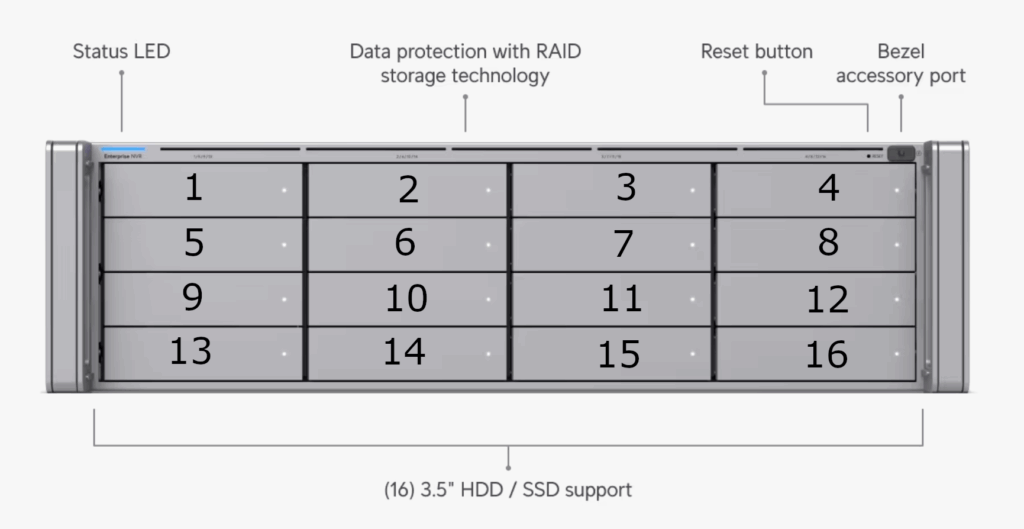
The drive layout to the physical enclosure is marked on each column of bays but here it is marked on the front of each bay, more obviously
Getting a Smart Report for the Disks in an ENVR from the Command Line
# ubnt-smart-tool
Usage: ubnt-smart-tool [options] [device_path]

        -h --help
                Print this text
        -j --json
                Print output in json format
        -l --list
                Scan all disks which support smart and dump their data
                This option will ignore [device_path]
        -w --rpm-whitelist <path>
                Specify custom RPM whitelist file path
                Default: /etc/ubnt-smart-tool/rpm_whitelist.conf

ERROR: Either one of "-l" or "device_path" should be provided
root@MYENVR:~# ubnt-smart-tool -l
=== START OF INFORMATION SECTION ===
Device Model:     WDC WD8002PURP-85C9JY0
Serial Number:    WD-AN2WZBZN
LU WWN Device Id: 5 0014ee 216d8fa23
Firmware Version: 82.00A82
User Capacity:    8,001,563,222,016 bytes [8.00 TB]
Sector Sizes:     512 bytes logical, 4096 bytes physical
Rotation Rate:    7200 rpm
Form Factor:      3.5 inches
Device is:        Not in smartctl database
ATA Version is:   ACS-4 published, ANSI INCITS 529-2018
SATA Version is:  SATA 3.2, 6.0 Gb/s (current: 6.0 Gb/s)
Local Time is:
SMART support is: Available - device has SMART capability.
SMART support is: Enabled

=== START OF ENABLE/DISABLE COMMANDS SECTION ===
SMART Enabled.
Warning! SMART Attribute Thresholds Structure error: invalid SMART checksum.

=== START OF READ SMART DATA SECTION ===
SMART overall-health self-assessment test result: PASSED

SMART Attributes Data Structure revision number: 16
Vendor Specific SMART Attributes with Thresholds:
ID# ATTRIBUTE_NAME          FLAG     VALUE WORST THRESH TYPE      UPDATED  WHEN_FAILED RAW_VALUE
  1 Raw_Read_Error_Rate     0x002f   200   200   051    Pre-fail  Always       -       0
  2 Throughput_Performance  0x0024   100   100   000    Old_age   Offline      -       0
  3 Spin_Up_Time            0x0027   253   100   021    Pre-fail  Always       -       2641
  4 Start_Stop_Count        0x0032   100   100   000    Old_age   Always       -       275
  5 Reallocated_Sector_Ct   0x0033   200   200   140    Pre-fail  Always       -       0
  7 Seek_Error_Rate         0x002e   200   200   000    Old_age   Always       -       0
  8 Seek_Time_Performance   0x0024   100   100   000    Old_age   Offline      -       0
  9 Power_On_Hours          0x0032   096   096   000    Old_age   Always       -       3494
 10 Spin_Retry_Count        0x0032   100   100   000    Old_age   Always       -       0
 11 Calibration_Retry_Count 0x0032   100   100   000    Old_age   Always       -       0
 12 Power_Cycle_Count       0x0032   100   100   000    Old_age   Always       -       274
192 Power-Off_Retract_Count 0x0032   200   200   000    Old_age   Always       -       269
193 Load_Cycle_Count        0x0032   200   200   000    Old_age   Always       -       5
194 Temperature_Celsius     0x0022   118   114   000    Old_age   Always       -       34
196 Reallocated_Event_Count 0x0032   200   200   000    Old_age   Always       -       0
197 Current_Pending_Sector  0x0032   200   200   000    Old_age   Always       -       16
198 Offline_Uncorrectable   0x0030   100   100   000    Old_age   Offline      -       0
199 UDMA_CRC_Error_Count    0x0032   200   200   000    Old_age   Always       -       0
200 Multi_Zone_Error_Rate   0x0008   100   100   000    Old_age   Offline      -       0

SMART Extended Comprehensive Error Log Version: 1 (6 sectors)
Device Error Count: 44 (device log contains only the most recent 24 errors)
        CR     = Command Register
        FEATR  = Features Register
        COUNT  = Count (was: Sector Count) Register
        LBA_48 = Upper bytes of LBA High/Mid/Low Registers ]  ATA-8
        LH     = LBA High (was: Cylinder High) Register    ]   LBA
        LM     = LBA Mid (was: Cylinder Low) Register      ] Register
        LL     = LBA Low (was: Sector Number) Register     ]
        DV     = Device (was: Device/Head) Register
        DC     = Device Control Register
        ER     = Error register
        ST     = Status register
Powered_Up_Time is measured from power on, and printed as
DDd+hh:mm:SS.sss where DD=days, hh=hours, mm=minutes,
SS=sec, and sss=millisec. It "wraps" after 49.710 days.

Error 44 [19] occurred at disk power-on lifetime: 3407 hours (141 days + 23 hours)
  When the command that caused the error occurred, the device was active or idle.

  After command completion occurred, registers were:
  ER -- ST COUNT  LBA_48  LH LM LL DV DC
  -- -- -- == -- == == == -- -- -- -- --
  04 -- 63 00 01 00 00 00 00 00 00 a0 00  Device Fault; Error: ABRT

  Commands leading to the command that caused the error were:
  CR FEATR COUNT  LBA_48  LH LM LL DV DC  Powered_Up_Time  Command/Feature_Name
  -- == -- == -- == == == -- -- -- -- --  ---------------  --------------------
  2f 00 00 00 01 00 00 00 00 00 00 a0 08     00:00:02.980  READ LOG EXT
  2f 00 00 00 01 00 00 00 00 00 00 a0 08     00:00:02.979  READ LOG EXT
  2f 00 00 00 01 00 00 00 00 00 00 a0 08     00:00:02.979  READ LOG EXT
  ef 00 10 00 02 00 00 00 00 00 00 a0 08     00:00:02.979  SET FEATURES [Enable SATA feature]
  ec 00 00 00 00 00 00 00 00 00 00 a0 08     00:00:02.935  IDENTIFY DEVICE

SMART Error Log Version: 1
ATA Error Count: 17 (device log contains only the most recent five errors)
        CR = Command Register [HEX]
        FR = Features Register [HEX]
        SC = Sector Count Register [HEX]
        SN = Sector Number Register [HEX]
        CL = Cylinder Low Register [HEX]
        CH = Cylinder High Register [HEX]
        DH = Device/Head Register [HEX]
        DC = Device Command Register [HEX]
        ER = Error register [HEX]
        ST = Status register [HEX]
Powered_Up_Time is measured from power on, and printed as
DDd+hh:mm:SS.sss where DD=days, hh=hours, mm=minutes,
SS=sec, and sss=millisec. It "wraps" after 49.710 days.

Error 17 occurred at disk power-on lifetime: 3407 hours (141 days + 23 hours)
  When the command that caused the error occurred, the device was active or idle.

  After command completion occurred, registers were:
  ER ST SC SN CL CH DH
  -- -- -- -- -- -- --
  04 63 02 00 00 00 a0  Device Fault; Error: ABRT

  Commands leading to the command that caused the error were:
  CR FR SC SN CL CH DH DC   Powered_Up_Time  Command/Feature_Name
  -- -- -- -- -- -- -- --  ----------------  --------------------
  ef 10 02 00 00 00 a0 08      00:00:02.979  SET FEATURES [Enable SATA feature]
  ec 00 00 00 00 00 a0 08      00:00:02.935  IDENTIFY DEVICE
  ef 03 45 00 00 00 a0 08      00:00:02.935  SET FEATURES [Set transfer mode]

Error 16 occurred at disk power-on lifetime: 3407 hours (141 days + 23 hours)
  When the command that caused the error occurred, the device was active or idle.

  After command completion occurred, registers were:
  ER ST SC SN CL CH DH
  -- -- -- -- -- -- --
  04 63 45 00 00 00 a0  Device Fault; Error: ABRT

  Commands leading to the command that caused the error were:
  CR FR SC SN CL CH DH DC   Powered_Up_Time  Command/Feature_Name
  -- -- -- -- -- -- -- --  ----------------  --------------------
  ef 03 45 00 00 00 a0 08      00:00:02.935  SET FEATURES [Set transfer mode]
  ef 10 02 00 00 00 a0 08      00:00:02.934  SET FEATURES [Enable SATA feature]

Error 15 occurred at disk power-on lifetime: 3407 hours (141 days + 23 hours)
  When the command that caused the error occurred, the device was active or idle.

  After command completion occurred, registers were:
  ER ST SC SN CL CH DH
  -- -- -- -- -- -- --
  04 63 02 00 00 00 a0  Device Fault; Error: ABRT

  Commands leading to the command that caused the error were:
  CR FR SC SN CL CH DH DC   Powered_Up_Time  Command/Feature_Name
  -- -- -- -- -- -- -- --  ----------------  --------------------
  ef 10 02 00 00 00 a0 08      00:00:02.934  SET FEATURES [Enable SATA feature]
  ec 00 00 00 00 00 a0 08      00:00:02.933  IDENTIFY DEVICE

Error 14 occurred at disk power-on lifetime: 3407 hours (141 days + 23 hours)
  When the command that caused the error occurred, the device was active or idle.

  After command completion occurred, registers were:
  ER ST SC SN CL CH DH
  -- -- -- -- -- -- --
  04 63 02 00 00 00 a0  Device Fault; Error: ABRT

  Commands leading to the command that caused the error were:
  CR FR SC SN CL CH DH DC   Powered_Up_Time  Command/Feature_Name
  -- -- -- -- -- -- -- --  ----------------  --------------------
  ef 10 02 00 00 00 a0 08      00:00:02.080  SET FEATURES [Enable SATA feature]
  ec 00 00 00 00 00 a0 08      00:00:02.030  IDENTIFY DEVICE
  ef 03 45 00 00 00 a0 08      00:00:02.029  SET FEATURES [Set transfer mode]

Error 13 occurred at disk power-on lifetime: 3407 hours (141 days + 23 hours)
  When the command that caused the error occurred, the device was active or idle.

  After command completion occurred, registers were:
  ER ST SC SN CL CH DH
  -- -- -- -- -- -- --
  04 63 45 00 00 00 a0  Device Fault; Error: ABRT

  Commands leading to the command that caused the error were:
  CR FR SC SN CL CH DH DC   Powered_Up_Time  Command/Feature_Name
  -- -- -- -- -- -- -- --  ----------------  --------------------
  ef 03 45 00 00 00 a0 08      00:00:02.029  SET FEATURES [Set transfer mode]
  ef 10 02 00 00 00 a0 08      00:00:02.029  SET FEATURES [Enable SATA feature]

=== START OF INFORMATION SECTION ===
# next device report
0 Comments