
May 2026
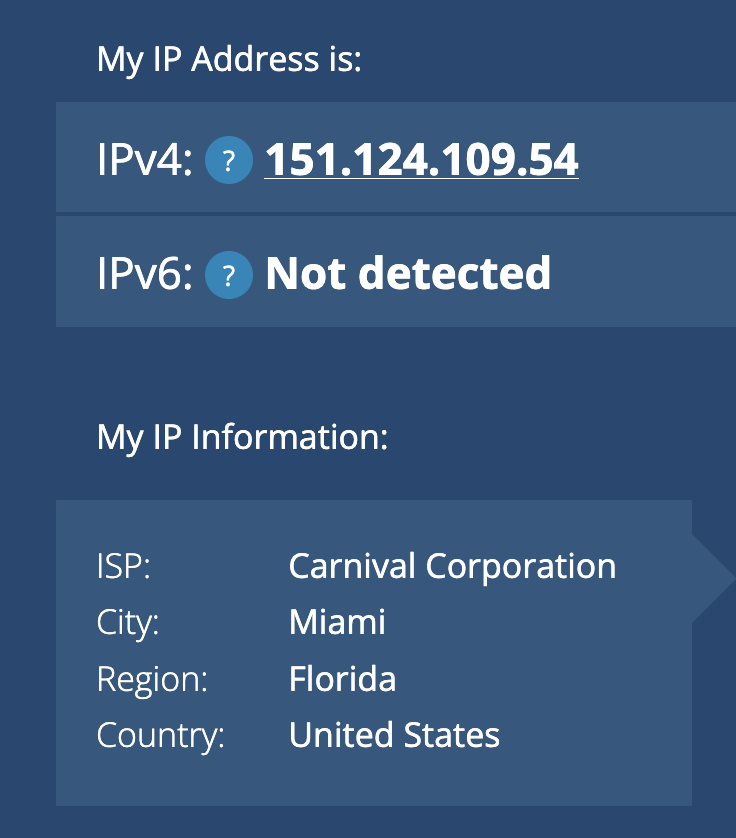
The "premium internet" package costs north of $35AUD a day. It is IPv4 only. The exit IPv4 address is a Florida IP but I also saw that the GeoIP was Carnival ISP and another time reported it as Germany too.
As they advertised you can access most social websites I checked e.g.. YouTube.com..., and work websites such as portal.azure.com unifi.ui.com are accessible (although I noticed a "Connecting to Site is taking longer than expected ..." warning and it timed out when trying to access the Unifi Network application. Connecting via a VPN fixed this and allowed me to connect to the admin pages)
Google searches sometimes throw up a unusual search warning asking you to solve a captcha before you can see the results.
If you get an ERR_CONNECTION_RESET on Chromium Based Browsers try Firefox / Safari
I found that this website (toggen.com.au) which is proxied behind Cloudflare had a ERR_CONNECTION_RESET error and I couldn't access it directly using Google Chrome or Brave or Edge Browsers. (I had no trouble accessing sites on the same webserver NOT proxied via Cloudflare). I could access it via Firefox and Safari. So I suspect there is something unique to Chrome and its cousin Brave that is causing an issue connecting across the Carnival network.
Firefox would intermittently throw an error, but not consistently like Chromium based browsers.
VPN's
Here are some VPN's I tested
OpenVPN on the standard port UDP/1194 worked
OpenVPN UDP on port 443 failed
Connecting to a standard Unifi Wireguard server didn't work (port 51820)
An OPNSense Wireguard server on a non standard port 465 (SMTPS port) worked
A Cloudflare Zero Trust VPN worked
Unifi Teleport using Wifiman Desktop on MacOS worked and I could access internal hosts on the UDM network. It took about 20 pings to come up...
Multi-Device Access
Trying to access Microsoft Remote Desktop Services via Remote Desktop Gateway connection from the ship. Your phone needs to have internet access to pick up the security prompts, and your laptop needs to be able to connect to the RDSGW
On the phone turn off Airplane mode
Connect to the Internet via your phone and turn on Hotspotting
Hotspot from the laptop to your phone
Build a VPN tunnel.
You can then get and respond to the Microsoft Authenticator Prompts on your phone and connect to RDS via the Windows App
After connecting, I was surprised that I could interact with the Remote Desktop session OK. I only used it for a few minutes so the bandwidth might come and go while connected for longer.
0 Comments