
Installed Greeshot but when pressing Print Screen key I got the default windows screen capture tool instead of Greenshot. The other key combinations launched Greenshot (Ctrl + Print Screen, Alt + Print Screen).
Update:
I just installed a Dell MK726 USB RF/Bluetooth wireless keyboard and the option has moved
I now find it under Settings => Bluetooth & Devices => Keyboard => Use the Print screen key to open screen capture
The problem is I can't seem to remap the print screen button to Greenshot any more...
Heard the MK726 was a Dell branded Logitech so tried the Logi Options app. No good.
Tried the Dell Display and Peripheral Manager next... Cannot remap the print screen key back to standard print screen function. Only screen snip app sigh.
ended Up mapping CTRL+SHIFT+S to Greenshots capture region command...
The fix:
Go into Settings => Accessibility => Keyboard => On-screen keyboard, access keys and Print screen and turn off "Use the Print screen key to open screen capture"
The name of the "Use the Print screen key to open screen capture" option has been changed from "Use the Print screen key to open Snipping Tool"
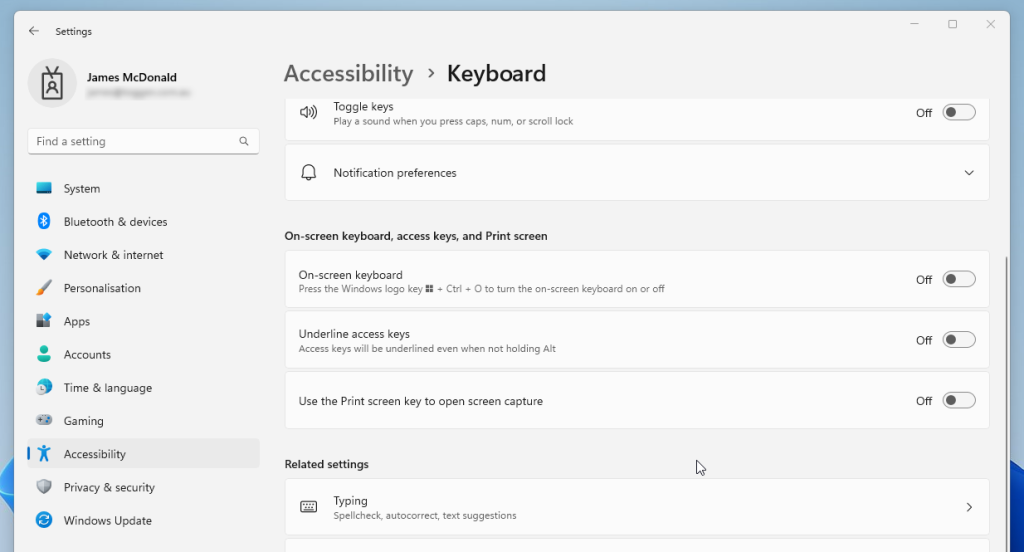
I'm not sure if this Greenshot part is required or just the reboot but for good measure do the following
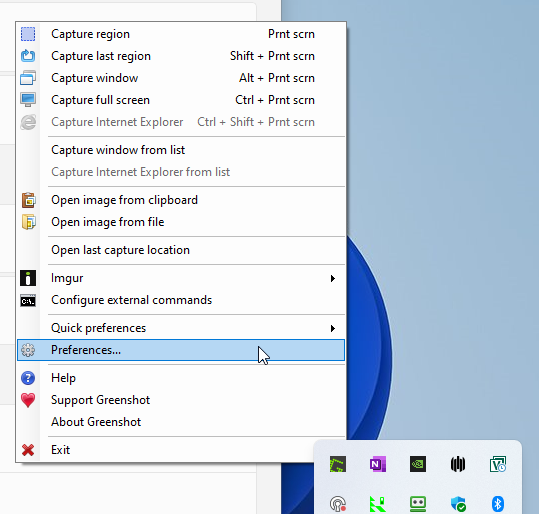
Open Greenshot => Preferences
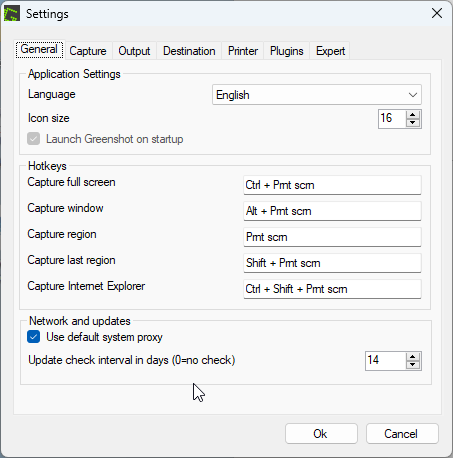
On the General tab click in "Capture region" clear Print scrn and then press your Print Screen key and click OK
I tried exiting the Greenshot App and restarting it but it didn't start working.
Rebooting my computer brought the Prnt scrn to Capture region functionality back
0 Comments