
I want to tweak and then re-sign the RDP file downloaded from https://rds.example.com/rdweb the RD Gateway RD Web server to stop it being tampered with
Steps
With a browser on you local computer (I'm using Windows 11)
connect to https://rds.example.com/rdweb authenticate and then download the RDP file
For this example I will call the RDP file downloaded from the RDWeb server cpub-MyCollection-New-MyCollection-New-CmsRdsh.rdp
Open the cpub-Desktop-New-Desktop-New-CmsRdsh.rdp file in notepad and remove both the following configuration keys and their values (for signatures:s: it's a big block of certificate text)
signscope:s:
signature:s:
Make any edits you want to make either by editing the RDP file open in notepad, or right clicking on the RDP file and selecting More options and the Edit on the context menu
On the RD Gateway or RD Web Server
Export your rds.example.com certificate and private key from your RD Gateway / RDWeb server. Provide a password and copy it to your local machine e.g. as rds.example.com.pfx (file name is not important)
On your local computer
Right click on the exported pfx file choose Install pfx from the context menu
In the Welcome to the Certificate Import Wizard select:
Current User
Browse to the pfx file
Enter the password, mark the key as exportable at the Private key protection dialog
Choose Automatically select the certificate store
The certificate should be in Certificates - Current User => Personal => Certificates in the "Manage user certificates" or to open it via command line user certmgr.msc
Open the certificate by double clicking it and then select the details tab scroll and copy the thumb print
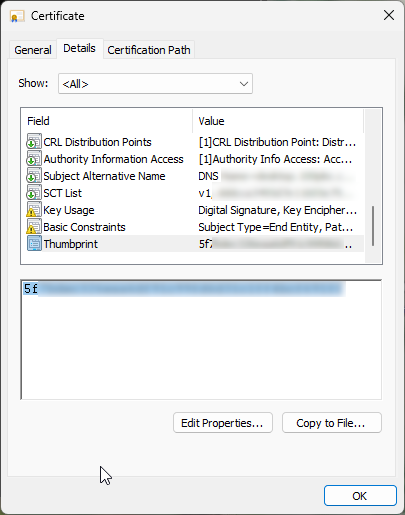
Open a terminal and then run rdpsign
rdpsign /sha256 5f70f96a2d9737f332d3043f205645a40e1b5397 "C:\temp\cpub-Desktop-New-Desktop-New-CmsRdsh.rdp"
All rdp file(s) have been succesfully signed.
Distribute your signed RDP file to your users.
Possible error when you don't have the cert available
Unable locate the certificate specified.  Error Code: 0x80092004
The rdp file could not be signed.  Error Code: 0x80092004
If you have the path to the rdp file wrong rdpsign will throw:
Unable to use the certificate specified for signing.  Error Code: 0x80070490
The rdp file could not be signed.  Error Code: 0x80070490
this is a great to have such information. I have tried it but not working. My server using other then default port. I had configured it but saying Remote Desktop can't find the computer "***". This might mean that "****" does not belong to the specified network. Verify the computer name and domain that you are trying to connect to.
Can you provide any help
I have had an error like this.
For me I was connecting to the RD Gateway with a hostname e.g. rdsgw.example.com, and I needed to to specify the correct INTERNAL IP or internally resolvable hostname of the RD Broker which will then connect you with the correct RD Session Host.
E.g. rdsgw.example.com for the RD Gateway "Use these RD Gateway server settings/server name" field and something like 192.168.77.5 or an internally resolvable hostname e.g. TGN-RDSBK.toggen.local pointing to the RDS Broker in the computer name field of the Remote Desktop Connection (mstsc.exe) Dialog