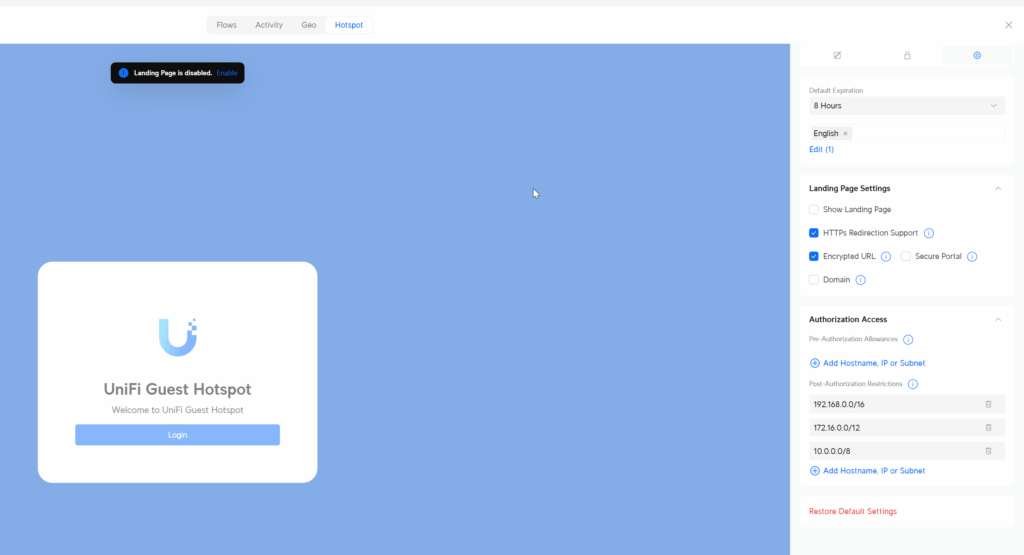
How to find Pre-Authorization Allowances and Post-Authorization Restrictions in Unifi Console

by James McDonald | Aug 15, 2025 | IT Tips | 0 comments

I Google this multiple times but find the "AI Overview" is the master of misdirection. Halucinated answers... sigh.

In the Unifi Network Console

  1. Click on Insight (globe icon left vertical tool bar)
  2. Hotspot
  3. Landing Page (icon next to Guests Icon)
  4. Once in the Landing Page View click the gear icon in the right hand pane and scroll down find the Pre-Authorization Allowances or Post-Authorization Restrictions.
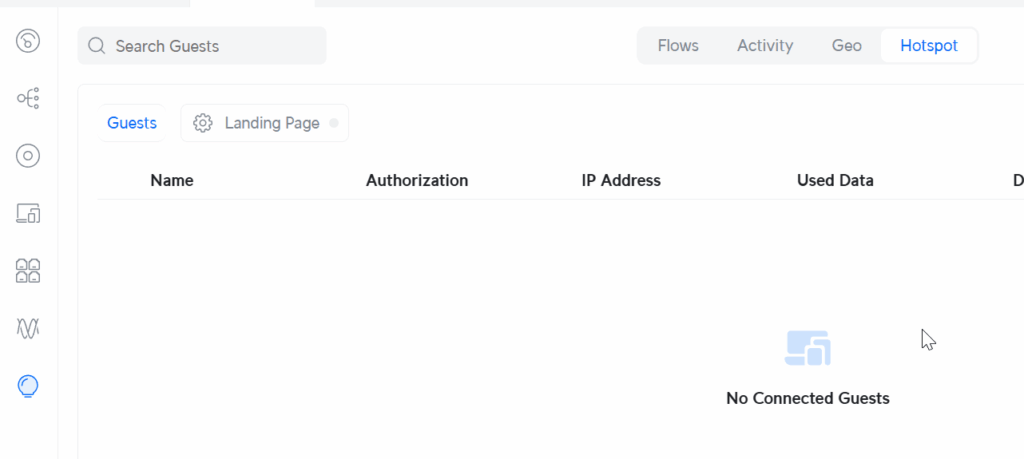
Insight => Hotspot => Landing Page
Right pane => Gear Icon => Authorization Access

0 Comments

Submit a Comment

Your email address will not be published. Required fields are marked *

This site is protected by reCAPTCHA and the Google Privacy Policy and Terms of Service apply.