
# /var/log/syslog
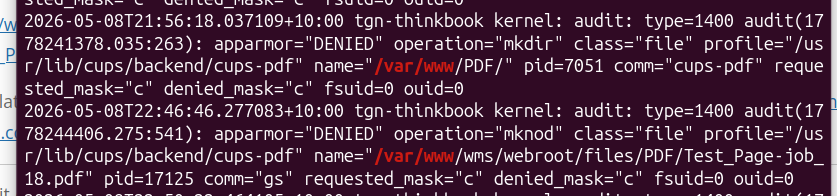
Apr 25 09:31:23 tgn-vm-wms01 kernel: audit: type=1400 audit(1650879083.060:80): apparmor="DENIED" operation="mknod" profile="/usr/lib/cups/backend/cups-pdf" name="/var/www/tgn/webroot/files/PDF/Test_Page-job_12.pdf" pid=80336 comm="gs" requested_mask="c" denied_mask="c" fsuid=1000 ouid=1000
Temporary Fix
If you run aa-complain it will stop apparmor from denying the write. However this is only a temporary solution as the aa policy needs to be updated to allow the custom location
sudo aa-complain /usr/lib/cups/backend/cups-pdf
Setting /usr/lib/cups/backend/cups-pdf to complain mode.
Once you know apparmor is the problem you need to identify what is being denied and then Update apparmor
Finding what apparmor is blocking
To find what is being denied look in syslog
cat /var/log/syslog | grep DENIED | grep /var/www
The output will show what apparmor is denying
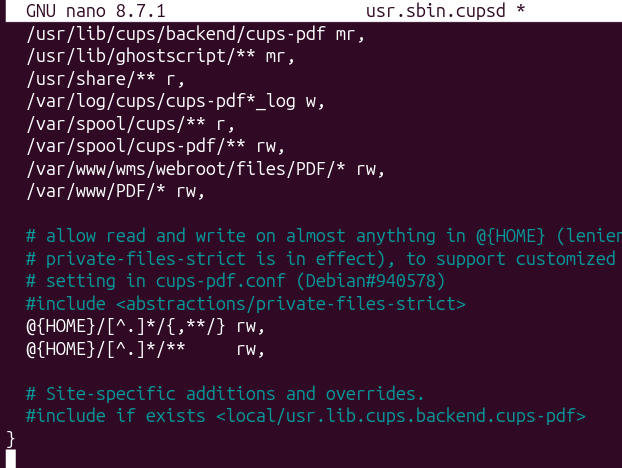
Editing apparmor policy files to allow writes to custom cups-pdf Out locations
# edit /etc/apparmor.d/usr.sbin.cupsd
# Add below before "}" the next two lines:
# allow the conf file to be read
   /etc/cups/cups-pdf-prod.conf r,
# allow the Out dir to be written to
   /var/www/wms/webroot/files/output/PDF/* rw,

 # Restart apparmor

 systemctl restart apparmor
References
This relates also to another post on this blog regarding creating multiple custom cups-pdf queues and Out dirs here => https://toggen.com.au/it-tips/adding-a-cups-pdf-printer-with-custom-output-dir-on-ubuntu-24-04-1-lts/
0 Comments